

What it is and what it’s for
Order status is an AI Agent feature that lets your customers check the status of their purchase directly from the chat, without leaving WhatsApp, Instagram, or Messenger.
When a customer asks about their order, the AI Agent checks the data in your connected store and responds with the real information for that purchase: status, estimated delivery date, tracking, and more.
Why you need it: “When will my order arrive?” is one of the most common questions after a purchase. Without this feature, each one requires someone on your team to look up the order in the store and reply manually.
What you use it for:
- Answer tracking questions instantly, at any time of day.
- Reduce the repetitive questions that reach your team.
- Give personalized answers with real data instead of generic messages.
- Improve the post-sale experience without the customer having to visit another site.
Before you start
Requirements:
- ✓ Have your AI Agent configured and active.
- ✓ Have your store connected to ChateCommerce on one of the compatible platforms.
- ✓ Have at least one connected channel: WhatsApp, Instagram, or Messenger.
Compatible platforms: Shopify, Tiendanube, VTEX, WooCommerce, and Magento.
Important note: the AI Agent can only show the information your store has on file. If an order has no tracking number or delivery date in the store, the agent won’t be able to share them.
How to enable Order status
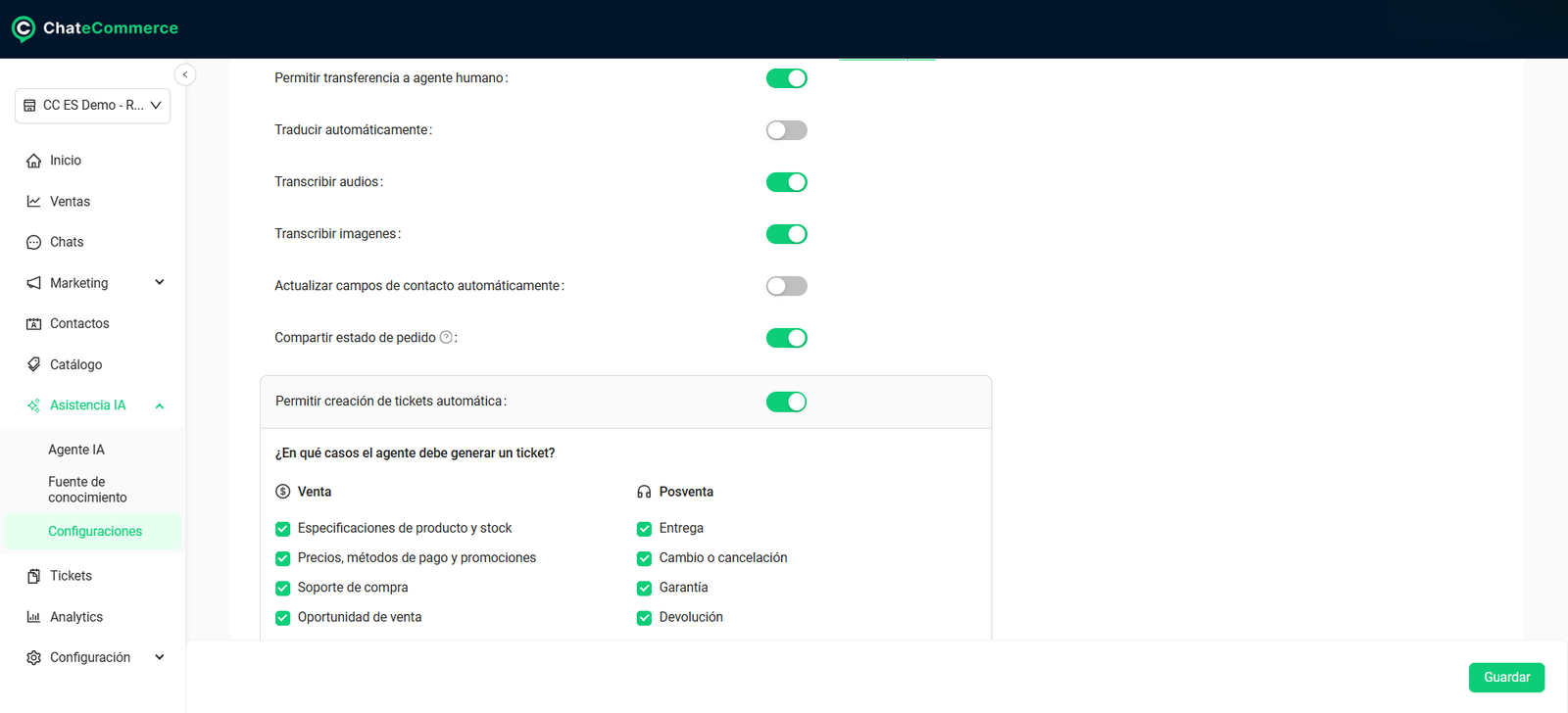
Go to AI Assistance → Settings and turn on Share order status.
From that moment on, the AI Agent will be able to answer order questions on all your connected channels.
How it works in practice
1. The customer starts the request
There are two ways:
- The AI Agent offers the “Check my order status” option during the conversation.
- The customer asks about their order directly. For example: “Where’s my order?”
2. The agent asks for information to identify the order
The AI Agent asks for one of these:
- Order number
- Email used for the purchase
3. The agent checks your store
With that information, the AI Agent checks your store through the platform’s API (the connection that allows ChateCommerce to read your order data). Depending on what your store has on file, it can retrieve:
| Data | Example |
|---|---|
| Order number | #1234567 |
| Current status | In transit |
| Purchase date | Aug 15, 2025 |
| Items purchased | 1 pair of sneakers, 2 t-shirts |
| Order total | USD 120 |
| Tracking | Number or link from the shipping company |
| Estimated delivery date | Aug 21, 2025 |
4. The agent responds with the real information
The AI Agent builds a personalized response with the order data.
Example response:
“Your order #1234567 is in transit. Delivery is expected on Aug 21, 2025. If tracking is available, I can share it with you here.”
What happens if the order isn’t found
If the AI Agent can’t find the order or there’s an error during the lookup, it shows a clear message and offers two options:
- Try again with the correct information.
- Continue through an alternative flow defined by your business.
This way, the conversation doesn’t stop and the customer always has a way forward.
Best practices
1. Keep order statuses up to date in your store. The AI Agent responds with what your store says. If an order was shipped but still shows as “Processing,” that’s what the customer will see.
2. Add the tracking number to every shipment. It’s the information customers value most and the one that prevents the most questions.
3. Make sure your customers have their order number. Include it prominently in the purchase confirmation email. If they can’t find it, they can use the email they used to buy.
4. Combine it with automatic tickets. If a customer checks their order and reports a delivery issue, the AI Agent can create a Post-sale → Delivery ticket so your team can step in.
Common issues and solutions
The agent doesn’t answer order questions
Possible cause: the feature isn’t enabled.
Solution: in AI Assistance → Settings, check that Share order status is turned on.
Possible cause: the store isn’t connected or isn’t on a compatible platform.
Solution: check that your store is connected in Settings → Stores and that it runs on Shopify, Tiendanube, VTEX, WooCommerce, or Magento.
The agent can’t find the order
Possible cause: the customer entered information that doesn’t match the order.
Solution: ask them to check the order number or use the exact email they used for the purchase.
Possible cause: the order was placed on a channel that isn’t connected, such as Mercado Libre or another store.
Solution: the AI Agent only checks orders from stores connected to ChateCommerce on compatible platforms.
The agent doesn’t share tracking or the delivery date
Possible cause: that information isn’t loaded in your store.
Solution: add the tracking number and estimated delivery date to each order from your ecommerce platform.
Frequently asked questions
What information does the customer need to check their order?
The order number or the email used for the purchase.
Does it work with Mercado Libre orders?
No. Order status works with Shopify, Tiendanube, VTEX, WooCommerce, and Magento.
Which channels does it work on?
WhatsApp, Instagram, and Messenger.
Can the agent change or cancel an order?
No. The AI Agent only checks and shares the status. If the customer wants to change or cancel their purchase, the agent can create a Post-sale → Exchange or cancellation ticket for your team to handle.
Is the information always up to date?
The agent checks your store at the moment the customer asks, so it shows the information exactly as it’s loaded at that time.
